Maui Distilleries And Wineries: Ocean Vodka, Hali‘imaile, Waikulu & MauiWine
June 12th, 2026
| Food & Drink
Written by Maui Snorkeling, operating tours to Molokini Crater, Turtle Town, and Coral Gardens from Māʻalaea Harbor since 1985. Tours are led by USCG-licensed captains aboard a USCG-inspected passenger vessel.
Last updated June 30, 2026
Quick Answer
Maui distilleries and wineries include Ocean Organic Farm & Distillery in Kula, Hali‘imaile Distilling Company in Makawao, Waikulu Distillery in Makawao, and MauiWine in ʻUlupalakua. These stops are best planned as an Upcountry tasting day or as a relaxed afternoon after snorkeling, as long as you eat, hydrate, and have a safe ride planned.
Main takeaways:
Best View Stop: Ocean Organic Farm & Distillery in Kula
Best Distillery Tour: Hali‘imaile Distilling Company in Makawao
Most Unique Spirits Stop: Waikulu Distillery for Maui-grown agave spirits
Best Winery Stop: MauiWine in scenic ʻUlupalakua
Best Snorkel Day Rule: Snorkel first, tastings after
If your Maui itinerary needs a break from beaches, hikes, and “where did we park?” conversations, an Upcountry tasting day can be a very fun change of pace.
Maui has a small but memorable craft sipping scene, from Ocean Vodka in Kula to Hali‘imaile Distilling, Waikulu Distillery, and MauiWine in ʻUlupalakua. Each stop has its own personality, scenery, and planning quirks.
This guide covers the best Maui distilleries and wineries, what each one is good for, and how to plan your tasting day responsibly. Tiny but important reminder: save tastings for after snorkeling, eat food, hydrate, and have a safe ride planned.
Maui Distilleries And Wineries At A Glance
Most of Maui’s distillery and winery stops are in Upcountry Maui, which means cooler air, scenic drives, big views, and a totally different feel from the beach towns.
The main stops visitors usually ask about are:
Ocean Organic Farm & Distillery: Known for Ocean Vodka, guided tastings, farm café, and sunset views.
Hali‘imaile Distilling Company: A working Upcountry distillery with tours, tastings, and a behind-the-scenes look at the distillation process.
Waikulu Distillery: A farm-to-bottle Maui distillery specializing in spirits made from 100% agave tequiliana grown on Maui.
MauiWine: A scenic ʻUlupalakua tasting room known for pineapple wines, sparkling wines, reds, whites, rosé, and Upcountry history.
Maui Distilleries And Wineries: Quick Comparison
Use this table to choose the best Upcountry tasting stop based on your route, your group’s interests, and how relaxed you want the day to feel.
Stop
Area
Best For
Planning Tip
Ocean OrganicFarm & Distillery
Kula / Upcountry
Ocean Vodka, guided tastings, farm café, sunset views, and a polished Upcountry stop
Check current tasting, dining, and event details before going
Hali‘imaileDistilling Company
Makawao / Hali‘imaile
Working distillery tour, distillation process, bottling, tastings, and local spirits
Bring valid photo ID and check tour availability before you go
WaikuluDistillery
Makawao / Upcountry
Maui-grown agave spirits, farm-to-bottle story, and a unique tasting experience
Tours require reservations, and tastings have specific hours
MauiWineʻUlupalakua
ʻUlupalakua / Kula
Pineapple wine, sparkling wine, red and white wines, historic tasting room, and scenic drive
Follow official driving directions because GPS may route incorrectly
Note: Hours, tour schedules, pricing, tasting availability, and reservation rules can change. Always check the official site before you drive Upcountry.
For most visitors, the easiest route through Maui's distilleries and wineries is to choose one distillery and one food or scenic stop instead of trying to visit everything in one day. Ocean Organic Farm & Distillery is a great spot for views, food, and cocktails. Hali‘imaile Distilling or Waikulu works well for a more focused distillery stop. MauiWine is best saved for a slower drive through ʻUlupalakua.
Ocean Organic Farm & Distillery
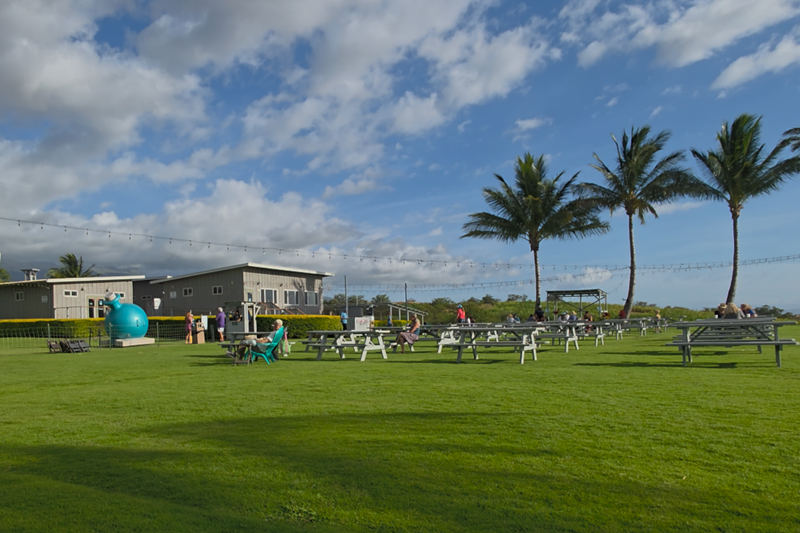
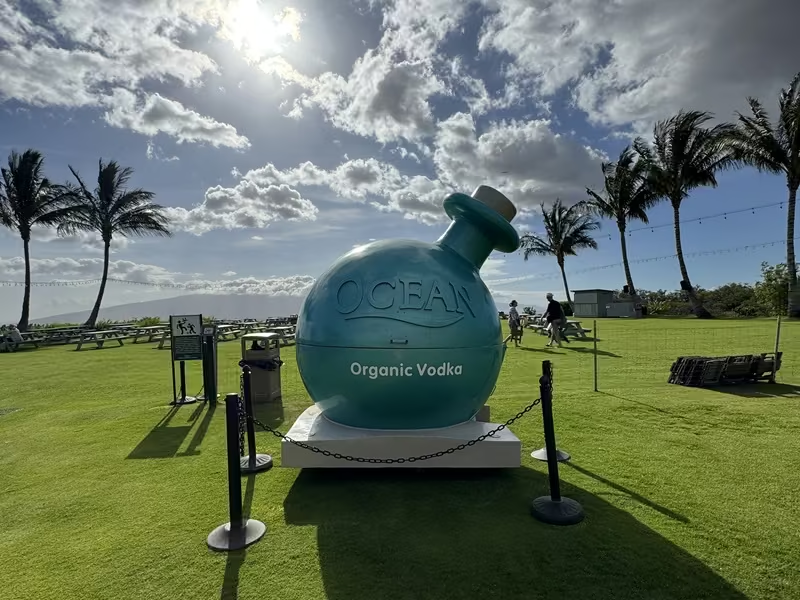
Ocean Organic Farm & Distillery is one of Maui’s most famous spirits stops, especially if you’ve seen Ocean Vodka on menus around the island. The property in Kula is perfect for those who want to try organic vodka in a relaxed Upcountry setting, with views, food, and plenty of space.
Best For
Visitors who want a polished distillery stop with great views
Fans of Ocean Vodka and craft cocktails
Groups who want food, drinks, and scenery in one place
Sunset timing, farm café plans, and casual Upcountry vibes
Planning Tip
Ocean is an easy fit on an Upcountry afternoon, especially if you want food and a tasting-style experience without making the day too complicated. Check the official site for current dining reservations, tasting details, and event updates before you go.
Hali‘imaile Distilling Company
Hali‘imaile Distilling Company, also commonly searched as Haliimaile Distilling, is a working Upcountry distillery in Makawao. It’s a good pick if your group wants more of a “how it’s made” experience rather than just sitting down for drinks.
Their tour experience highlights the distillation process, ingredients, bottling, and tastings for guests who are old enough to participate.
Best For
People who like behind-the-scenes tours
Visitors staying or exploring near Makawao, Pukalani, or Kula
Groups who want a shorter, structured distillery experience
Travelers interested in Maui-made spirits and local ingredients
Planning Tip
Bring a valid photo ID if you plan to enter the tasting room or participate in tastings. If your group includes guests under 21, check the official visitor information first so everyone knows what to expect.
Waikulu Distillery
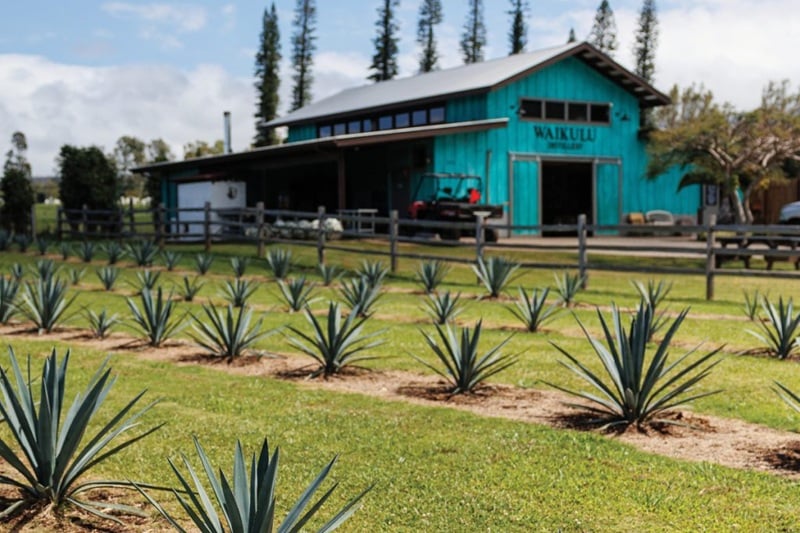
Waikulu Distillery is one of the most unique stops on this list because it specializes in spirits made from 100% agave tequiliana grown on Maui. It’s a farm-to-bottle experience in Makawao, and it’s a great option if you like small producers and unusual Maui-grown stories.
Best For
Visitors who want something different from vodka, rum, or wine
Agave-spirit fans
Upcountry road trip days
People who like small-scale farm-to-bottle experiences
Planning Tip
Waikulu’s tours and tastings have specific schedules and reservation notes, so check the official site before you go. It’s not the type of stop where you want to wing it after a long beach day and hope for the best.
MauiWine In ʻUlupalakua
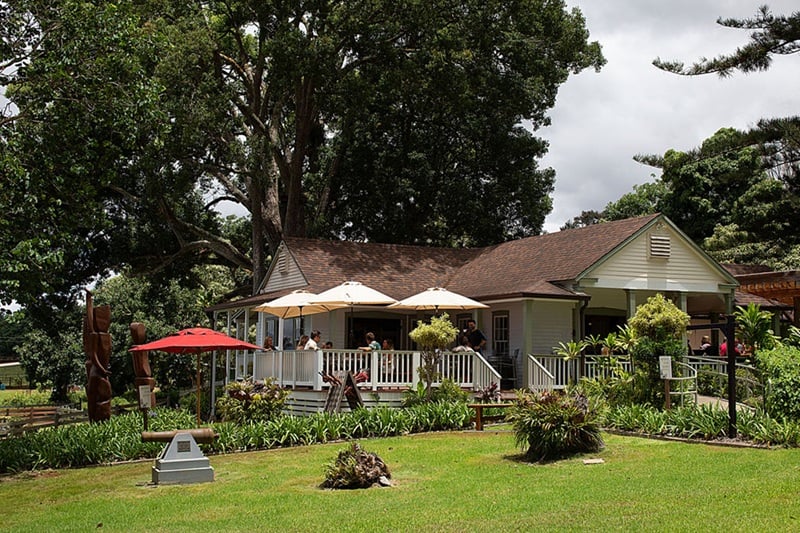
If you're searching for a Maui winery experience, MauiWine is the island’s classic Upcountry tasting stop. It sits near Ulupalakula Ranch, and the drive itself is part of the fun, with cooler air, ranch country, and a slower Upcountry feel.
The tasting room experience can be simple or more immersive, depending on what you reserve. You’ll find pineapple wines, sparkling wines, whites, rosé, reds, and light fare depending on current offerings.
Best For
Wine lovers who want a scenic Upcountry stop
Couples, adults, and slower-paced itinerary days
Visitors who want something very different from the beach scene
Pairing with a Kula, ʻUlupalakua, or Upcountry scenic drive
Planning Tip
MauiWine specifically warns that GPS may route visitors incorrectly, so follow the winery’s official directions before driving all the way Upcountry. Also, rideshare availability can be limited in the area, so transportation planning matters.
You can, but that doesn’t mean you should try to cram every stop into one giant tasting marathon. Maui driving takes time. Upcountry roads can be slower, and tastings are more fun when you’re not rushing.
A better plan is to choose one of these:
Half-Day Upcountry Spirits Plan: Ocean Vodka plus Hali‘imaile or Waikulu.
Wine And Scenic Drive Plan: MauiWine plus an Upcountry lunch or coffee stop.
Slow Sips Day: One reservation, one meal, one scenic stop, and zero rushing.
How To Pair A Snorkel Day With A Tasting Day
If you’re planning snorkeling and tastings on the same trip, the easiest rule is simple:
Snorkel first, sip later.
Alcohol before snorkeling is a bad idea. Snorkeling should be done clear-headed, hydrated, and comfortable. If you’re planning both in the same day, do a morning snorkel tour, eat lunch, hydrate, rest, and then decide whether your group still wants a mellow tasting stop later.
If you’re coming off the Molokini Crater Snorkeling Tour, you’ll usually have the most flexibility after midday. The smartest plan is:
Eat lunch. Don't skip this step. Your future self is hungry.
Hydrate. Saltwater, sun, and boat time are sneaky.
Shower or change. Upcountry feels better when you’re not crusted in salt.
Pick one tasting stop. One good stop beats three rushed ones.
Use a safe ride plan. Designated driver, rideshare where reliable, or pre-arranged transportation.
Best Plan After An Afternoon Snorkeling Tour
If you’re doing the Afternoon Snorkeling Tour, keep your tasting plans for another day. You’ll be finishing later, and most visitors are better off having dinner, enjoying the sunset, and having a relaxed evening.
Trying to squeeze in an Upcountry tasting after an afternoon ocean trip is usually too much. This is a vacation, not a reality show challenge.
Responsible Planning Tips
Bring Valid ID: You’ll need ID for tastings.
Check Hours And Reservations: Schedules can change quickly.
Don’t Drink Before Snorkeling: Keep ocean time clear-headed.
Eat Food: Sun plus tasting on an empty stomach is a mistake with consequences.
Plan Transportation: Upcountry rideshare can be limited, especially near MauiWine.
Pick Fewer Stops: Two relaxed stops are better than four rushed ones.
Popular tasting stops include Ocean Organic Farm & Distillery, Hali‘imaile Distilling Company, Waikulu Distillery, and MauiWine. Each one has a different style, so choose based on your route and interests.
Ocean Organic Farm & Distillery is in Kula, Upcountry Maui. It’s known for Ocean Vodka, guided tastings, farm café options, and scenic views.
Yes. Hali‘imaile Distilling Company offers guided tours and tastings. Check the official site for current schedule, pricing, age rules, and reservation details.
Waikulu Distillery is known for farm-to-bottle spirits made from 100% agave tequiliana grown on Maui. Check their current tour and tasting schedule before you go.
Yes, especially if you want a scenic Upcountry tasting room and a slower ʻUlupalakua day. MauiWine offers wine flights, wines by the glass, light fare, and more immersive experiences depending on current availability.
No. Snorkeling should be done clear-headed and hydrated. If you want to pair snorkeling with a tasting stop, snorkel first and save distilleries or wineries for afterward.
Often, yes. Some stops recommend reservations, and some tours require them. Always check official pages before driving Upcountry.
Final Thoughts
Maui distilleries and wineries are a fun way to add Upcountry flavor to your itinerary. Ocean Vodka is great for views and a polished farm-distillery experience. Hali‘imaile gives you a working distillery tour. Waikulu is a unique Maui-grown agave stop. MauiWine brings the scenic ʻUlupalakua wine-country feel.
Just remember the golden rule for planning a trip to Maui: ocean first, tastings later. Snorkel smart, eat well, hydrate, and let your Maui tasting day stay relaxed.
Prefer craft beer instead? See our guide to Breweries in Maui, Hawaii, for Maui Brewing Company, Lāhainā Brewing Company, Koholā Series beers, Mahalo Aleworks, and Wailea brewpub stops.
Sources & Updates
Use these official resources to confirm Maui distillery and winery tour schedules, tasting availability, reservation requirements, hours, directions, age rules, and safe transportation details before your Upcountry tasting day.
To provide the best experiences, we use technologies like cookies to store and/or access device information. Consenting to these technologies will allow us to process data such as browsing behavior or unique IDs on this site. Not consenting or withdrawing consent, may adversely affect certain features and functions.
Functional
Always active
The technical storage or access is strictly necessary for the legitimate purpose of enabling the use of a specific service explicitly requested by the subscriber or user, or for the sole purpose of carrying out the transmission of a communication over an electronic communications network.
Preferences
The technical storage or access is necessary for the legitimate purpose of storing preferences that are not requested by the subscriber or user.
Statistics
The technical storage or access that is used exclusively for statistical purposes.The technical storage or access that is used exclusively for anonymous statistical purposes. Without a subpoena, voluntary compliance on the part of your Internet Service Provider, or additional records from a third party, information stored or retrieved for this purpose alone cannot usually be used to identify you.
Marketing
The technical storage or access is required to create user profiles to send advertising, or to track the user on a website or across several websites for similar marketing purposes.
This mode enables people with epilepsy to use the website safely by eliminating the risk of seizures that result from flashing or blinking animations and risky color combinations.
Visually Impaired Mode
Improves website's visuals
This mode adjusts the website for the convenience of users with visual impairments such as Degrading Eyesight, Tunnel Vision, Cataract, Glaucoma, and others.
Cognitive Disability Mode
Helps to focus on specific content
This mode provides different assistive options to help users with cognitive impairments such as Dyslexia, Autism, CVA, and others, to focus on the essential elements of the website more easily.
ADHD Friendly Mode
Reduces distractions and improve focus
This mode helps users with ADHD and Neurodevelopmental disorders to read, browse, and focus on the main website elements more easily while significantly reducing distractions.
Readable Experience
Content Scaling
Default
Text Magnifier
Readable Font
Dyslexia Friendly
Highlight Titles
Highlight Links
Font Sizing
Default
Line Height
Default
Letter Spacing
Default
Left Aligned
Center Aligned
Right Aligned
Visually Pleasing Experience
Dark Contrast
Light Contrast
Monochrome
High Contrast
High Saturation
Low Saturation
Adjust Text Colors
Adjust Title Colors
Adjust Background Colors
Easy Orientation
Mute Sounds
Hide Images
Hide Emoji
Reading Guide
Stop Animations
Reading Mask
Highlight Hover
Highlight Focus
Big Dark Cursor
Big Light Cursor
Cognitive Reading
Navigation Keys
Accessibility Statement
mauisnorkeling.com
November 14, 2026
Compliance status
We firmly believe that the internet should be available and accessible to anyone, and are committed to providing a website that is accessible to the widest possible audience,
regardless of circumstance and ability.
To fulfill this, we aim to adhere as strictly as possible to the World Wide Web Consortium’s (W3C) Web Content Accessibility Guidelines 2.1 (WCAG 2.1) at the AA level.
These guidelines explain how to make web content accessible to people with a wide array of disabilities. Complying with those guidelines helps us ensure that the website is accessible
to all people: blind people, people with motor impairments, visual impairment, cognitive disabilities, and more.
This website utilizes various technologies that are meant to make it as accessible as possible at all times. We utilize an accessibility interface that allows persons with specific
disabilities to adjust the website’s UI (user interface) and design it to their personal needs.
Additionally, the website utilizes an AI-based application that runs in the background and optimizes its accessibility level constantly. This application remediates the website’s HTML,
adapts Its functionality and behavior for screen-readers used by the blind users, and for keyboard functions used by individuals with motor impairments.
If you’ve found a malfunction or have ideas for improvement, we’ll be happy to hear from you. You can reach out to the website’s operators by using the following email
Screen-reader and keyboard navigation
Our website implements the ARIA attributes (Accessible Rich Internet Applications) technique, alongside various different behavioral changes, to ensure blind users visiting with
screen-readers are able to read, comprehend, and enjoy the website’s functions. As soon as a user with a screen-reader enters your site, they immediately receive
a prompt to enter the Screen-Reader Profile so they can browse and operate your site effectively. Here’s how our website covers some of the most important screen-reader requirements,
alongside console screenshots of code examples:
Screen-reader optimization: we run a background process that learns the website’s components from top to bottom, to ensure ongoing compliance even when updating the website.
In this process, we provide screen-readers with meaningful data using the ARIA set of attributes. For example, we provide accurate form labels;
descriptions for actionable icons (social media icons, search icons, cart icons, etc.); validation guidance for form inputs; element roles such as buttons, menus, modal dialogues (popups),
and others. Additionally, the background process scans all the website’s images and provides an accurate and meaningful image-object-recognition-based description as an ALT (alternate text) tag
for images that are not described. It will also extract texts that are embedded within the image, using an OCR (optical character recognition) technology.
To turn on screen-reader adjustments at any time, users need only to press the Alt+1 keyboard combination. Screen-reader users also get automatic announcements to turn the Screen-reader mode on
as soon as they enter the website.
These adjustments are compatible with all popular screen readers, including JAWS and NVDA.
Keyboard navigation optimization: The background process also adjusts the website’s HTML, and adds various behaviors using JavaScript code to make the website operable by the keyboard. This includes the ability to navigate the website using the Tab and Shift+Tab keys, operate dropdowns with the arrow keys, close them with Esc, trigger buttons and links using the Enter key, navigate between radio and checkbox elements using the arrow keys, and fill them in with the Spacebar or Enter key.Additionally, keyboard users will find quick-navigation and content-skip menus, available at any time by clicking Alt+1, or as the first elements of the site while navigating with the keyboard. The background process also handles triggered popups by moving the keyboard focus towards them as soon as they appear, and not allow the focus drift outside it.
Users can also use shortcuts such as “M” (menus), “H” (headings), “F” (forms), “B” (buttons), and “G” (graphics) to jump to specific elements.
Disability profiles supported in our website
Epilepsy Safe Mode: this profile enables people with epilepsy to use the website safely by eliminating the risk of seizures that result from flashing or blinking animations and risky color combinations.
Visually Impaired Mode: this mode adjusts the website for the convenience of users with visual impairments such as Degrading Eyesight, Tunnel Vision, Cataract, Glaucoma, and others.
Cognitive Disability Mode: this mode provides different assistive options to help users with cognitive impairments such as Dyslexia, Autism, CVA, and others, to focus on the essential elements of the website more easily.
ADHD Friendly Mode: this mode helps users with ADHD and Neurodevelopmental disorders to read, browse, and focus on the main website elements more easily while significantly reducing distractions.
Blindness Mode: this mode configures the website to be compatible with screen-readers such as JAWS, NVDA, VoiceOver, and TalkBack. A screen-reader is software for blind users that is installed on a computer and smartphone, and websites must be compatible with it.
Keyboard Navigation Profile (Motor-Impaired): this profile enables motor-impaired persons to operate the website using the keyboard Tab, Shift+Tab, and the Enter keys. Users can also use shortcuts such as “M” (menus), “H” (headings), “F” (forms), “B” (buttons), and “G” (graphics) to jump to specific elements.
Additional UI, design, and readability adjustments
Font adjustments – users, can increase and decrease its size, change its family (type), adjust the spacing, alignment, line height, and more.
Color adjustments – users can select various color contrast profiles such as light, dark, inverted, and monochrome. Additionally, users can swap color schemes of titles, texts, and backgrounds, with over seven different coloring options.
Animations – person with epilepsy can stop all running animations with the click of a button. Animations controlled by the interface include videos, GIFs, and CSS flashing transitions.
Content highlighting – users can choose to emphasize important elements such as links and titles. They can also choose to highlight focused or hovered elements only.
Audio muting – users with hearing devices may experience headaches or other issues due to automatic audio playing. This option lets users mute the entire website instantly.
Cognitive disorders – we utilize a search engine that is linked to Wikipedia and Wiktionary, allowing people with cognitive disorders to decipher meanings of phrases, initials, slang, and others.
Additional functions – we provide users the option to change cursor color and size, use a printing mode, enable a virtual keyboard, and many other functions.
Browser and assistive technology compatibility
We aim to support the widest array of browsers and assistive technologies as possible, so our users can choose the best fitting tools for them, with as few limitations as possible. Therefore, we have worked very hard to be able to support all major systems that comprise over 95% of the user market share including Google Chrome, Mozilla Firefox, Apple Safari, Opera and Microsoft Edge, JAWS and NVDA (screen readers).
Notes, comments, and feedback
Despite our very best efforts to allow anybody to adjust the website to their needs. There may still be pages or sections that are not fully accessible, are in the process of becoming accessible, or are lacking an adequate technological solution to make them accessible. Still, we are continually improving our accessibility, adding, updating and improving its options and features, and developing and adopting new technologies. All this is meant to reach the optimal level of accessibility, following technological advancements. For any assistance, please reach out to