Maluaka Beach Snorkeling Guide: Turtle Town in Makena
October 16th, 2024
| Areas & Town Guides
Written by Maui Snorkeling, operating tours to Molokini Crater, Turtle Town, and Coral Gardens from Māʻalaea Harbor since 1985. Tours are led by USCG-licensed captains aboard a USCG-inspected passenger vessel.
Last updated July 29, 2026
Quick Answer:Maluaka Beach Maui is one of Makena's best shore snorkeling spots and an easy public access point for the Turtle Town reef area. On calm mornings, the best snorkeling is usually near the south-end reef, where you'll find clear water, coral, reef fish, and a chance to see honu. It's a great beach for confident beginners and families when conditions are calm, but there's no lifeguard, so don't go in if the water looks rough or murky.
Main Takeaways:
Best Time To Go: Morning for calmer water, lighter wind, and better visibility
Best Snorkeling Area: Enter from the sand and explore the south-end reef when conditions are calm
Parking: Use the north or south access lots, and arrive early since spaces can fill up
Turtle Etiquette: Give honu plenty of space, don't touch or chase them, and keep at least 10 feet away
Do Not Force It: If it's windy, rough, or murky, make it a beach day or choose a safer backup spot
Bonus: Maluaka has a long sandy beach, restrooms, showers, picnic areas, and beautiful Makena views
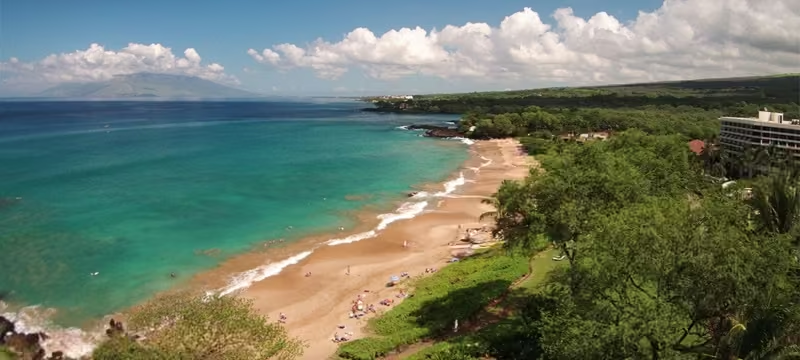
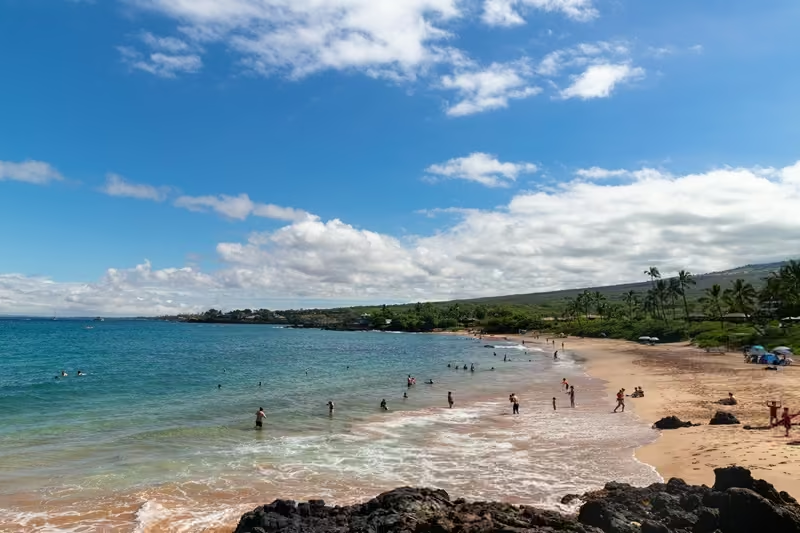
Maluaka Beach is a sandy South Maui beach in Makena with a fringing reef at the south end that can offer excellent snorkeling on calm mornings, plus frequent honu (Hawaiian green sea turtle) sightings.
This area is often nicknamed “Turtle Town” because turtles regularly graze along the nearby reef. If you’re researching the broader Turtle Town reef area (boat vs. shore, what you’ll see, conditions), start here: Turtle Town Snorkeling Maui guide.
Use this Maluaka guide for the practical shore details: parking lots, restrooms, entry points, and safety.
Maluaka Beach Maui At A Glance
Here’s a quick look at what to know before visiting Maluaka Beach for swimming, snorkeling, and a relaxing beach day in Makena.
Topic
Details
Location
Makena, South Maui, just south of Wailea
Best For
Calm morning snorkeling, beach days, swimming, and responsible honu viewing
Best Snorkeling Area
The south-end reef near the rocky point when the ocean is calm and clear
Entry
Enter from the sand before swimming toward the reef structure
Lifeguard
No lifeguard is on duty, so check conditions carefully before entering the water
Amenities
Parking, restrooms, outdoor showers, picnic areas, and public beach access
Note: Ocean conditions can change quickly. Snorkel only when the water is calm and clear, and make it a beach day if it’s windy, rough, or murky.
Why is Maluaka called "Turtle Town"
“Turtle Town” isn’t one official pin on a map; it’s a nickname people use for a South Maui reef zone where honu are commonly seen feeding and cruising along the reef edges.
Maluaka Beach is the best-known public shore access in this area, which is why the names are used interchangeably in travel planning.
For the full Turtle Town overview (where it is, what you’ll see, tour vs. shore), read our Turtle Town Snorkeling guide.
Where is Maluaka Beach?
Maluaka Beach sits in Makena (South Maui), just south of Wailea, near the former Maui Prince Hotel/Makena Beach & Golf Resort site (now the private Mākena Golf & Beach Club).
Maluaka Beach Map and Driving Directions
Short answer: Maluaka Beach is in Makena (South Maui), just south of Wailea. Most visitors use either the north lot by Keawalaʻi Church or the south lot at the end of Makena Keonoio Rd.
North lot by Keawalaʻi Church
Best if you want the closest restrooms/showers and easier drop-off.
South lot by Makena Keonoio Road
Larger lot with stairs down to the sand and quicker access to the south-end reef.
Pro tip: If your main goal is snorkeling, plan to arrive early and start on the south end when the ocean is calm.
Maluaka Beach is one of South Maui’s best shore snorkels because the south end has a lively fringing reef, a sandy entry, and frequent honu (green sea turtle) sightings on calm days.
Great on calm mornings: Often clearer visibility and less chop before trade winds build.
Easy beach day setup: Sand, room to spread out, and two nearby public parking options.
Snorkel + relax: You can snorkel the reef, then enjoy the beach without needing a boat.
Note: Conditions can change quickly. If you see surf, surge, or low visibility, choose a safer beach or go another day.
Pro Tip: It’s essential to give the turtles space and admire them from a distance. Hawaiian green sea turtles are a protected species, and you must not disturb their natural habitat.
Family-Friendly Beach
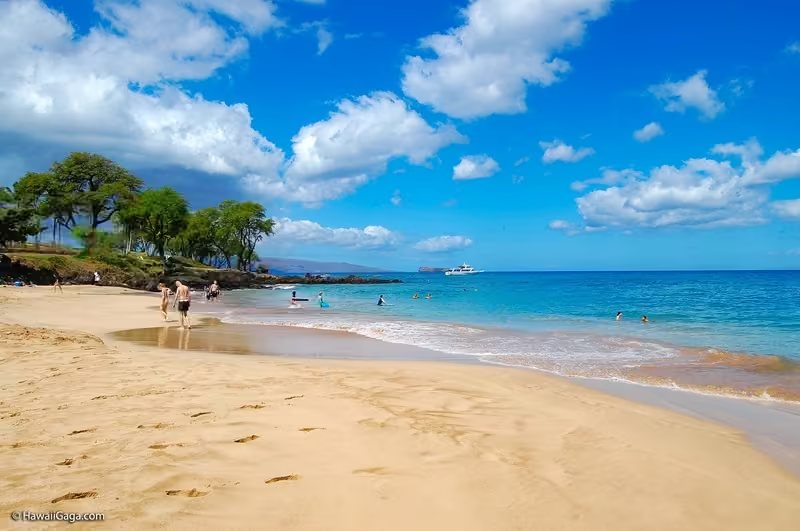
On calm days, Maluaka can be a great family beach thanks to its sandy bottom and generally gentle entry points. There is no lifeguard, so always check conditions and keep kids within arm’s reach in the water.
Sunbathing and Sunset Views
Maluaka is long, sandy, and usually less crowded than many resort-front beaches. Its south-facing coastline can deliver beautiful late-day light and sunsets (especially when skies are clear).
Quieter than Wailea and Kaanapali
If you want a calmer beach vibe, especially early morning or late afternoon, Maluaka is often quieter than busier resort areas.
Maluaka has two main public parking areas. The north lot (by Keawalaʻi Church) is closest to restrooms and outdoor showers. The south lot (at the end of Makena Keonoio Rd) is larger and provides quicker access to the south-end reef, but requires stairs down to the sand.
Arrive early: Both lots can fill up, especially on calm mornings.
Plan your rinse-off: If you park in the south lot, amenities are closer to the north end.
Snorkeling Maluaka Beach (Reef Layout and What You'll See)
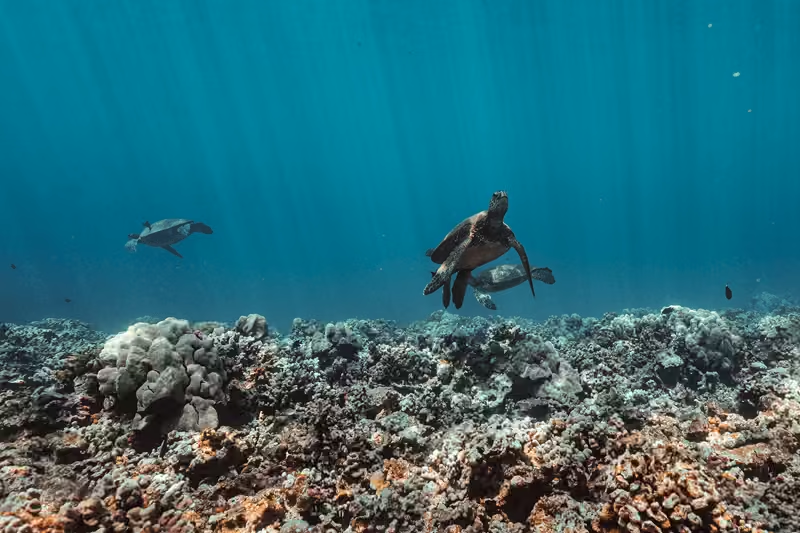
The best snorkeling is usually on the south end, where the fringing reef starts near the rocky point and curves outward. On calm mornings, visibility can be excellent, and turtle sightings are common.
Best Entry Points for Snorkeling (South End Reef)
Start on the south end near the rocky point (this is where the reef begins).
Enter on sand, not on rocks or coral.
Follow the reef edge as it curves outward; stay aware of surge and current.
If the ocean looks rough, skip snorkeling and enjoy the beach from shore instead.
What You’ll See
Honu grazing along the reef
Reef fish around coral heads and lava fingers
Occasional rays and other reef visitors (not guaranteed)
Maluaka can also work for offshore dive outings when conditions are calm. If you’re diving, go with a licensed local operator and follow their site-specific entry and safety guidance.
Ocean Conditions and Safety at Maluaka Beach
Important: There is no lifeguard at Maluaka Beach. Always check real-time conditions before entering and choose a lifeguarded beach if you’re unsure.
Best conditions are often early: mornings are commonly calmer with better visibility.
Skip if rough: if you see surf, strong surge, or low visibility, do not snorkel.
Snorkel smart: stay close to your group, use flotation if needed, and don’t push past your comfort level.
Honu Turtle Etiquette (10 Foot Rule)
Hawaiian green sea turtles are protected. The recommended viewing distance is at least 10 feet (3 meters), on land and in the water.
Never touch, chase, feed, surround, or ride turtles.
Do not block a turtle’s path to the surface (they must breathe).
Give resting turtles extra space and keep people back.
Maluaka Beach has picnic tables and BBQ grills, making it a great beach-day basecamp.
Bring water, shade, and easy-to-pack food.
Leave no trace: pack out trash and secure food from birds.
If lots are full or it’s windy, keep plans flexible.
Wildlife Watching and Photography
Maluaka is a great place for shoreline photos: bright sand, clear water, and Makena’s coastline in the background.
Watch for seabirds and occasional dolphins offshore.
In whale season (typically winter months), you may spot humpback whales in the distance from shore.
Use zoom, don’t approach wildlife for photos.
What to Bring for Maluaka Beach Snorkeling
Mask + snorkel + fins: fit matters (a leaky mask ruins the day).
Reef-safe sun protection: plus a rash guard for easier reapplication.
Water + electrolytes: especially if you’re arriving early and staying a while.
Flotation: a snorkel vest is helpful for beginners and calmer breathing.
Dry bag + towel: for phones/keys and post-snorkel cleanup.
Tips for Visiting Maluaka Beach
Arrive early: better parking + better odds of calm snorkeling.
Start on the south end (if calm): that’s where the reef is most consistent.
Respect wildlife: admire honu from a distance and never feed fish.
Check conditions: if it looks rough, switch beaches instead of forcing it.
Plan for amenities: restrooms/showers are closest to the north lot.
Nearby Things to Do
Visit Keawalaʻi Church: This historic Makena church sits near the north access area and is one of the easiest landmarks for finding Maluaka Beach.
Explore Mākena State Park: Big Beach is nearby and works well for a scenic beach stop. Use our Makena Beach and Big Beach Guide to check parking, hours, facilities, and shorebreak safety before visiting.
Try a backup snorkel spot: Makena Landing and Poʻolenalena Beach can be useful alternatives when Maluaka is windy, rough, or murky.
Head back toward Wailea: Wailea has restaurants, resort areas, shopping, and the Wailea Beach Path if you want an easy post-beach plan.
Alternatives if Maluaka is Rough (Backup Snorkel Spots)
If Maluaka is rough, surgy, or cloudy, don’t force it. Two nearby backups are:
Makena Landing: often calmer and turtle-friendly, but watch for kayak/SUP traffic.
Poʻolenalena Beach: wide sandy beach; snorkeling can be better near rocky ends when seas are calm.
Rule of thumb: choose the calmest water you can find that day, even if it wasn’t your original plan.
Choosing between Maluaka Beach, Makena Landing, and Turtle Town by boat? Compare access, beginner fit, facilities, and conditions across 12 Maui snorkeling spots.
FAQs
Maluaka Beach is in Makena (South Maui), just south of Wailea. Use the public access from Makena Road for the north lot or Makena Keonoio Road for the south lot.
Turtle Town is a nickname for a stretch of South Maui reef known for frequent green sea turtle sightings. This beach is the most popular shore access to this area.
There are two public lots. The north lot by Keawalaʻi Church has restrooms and showers. The south lot at the end of Makena Keonoio Road has stairs to the beach. Arrive early; spaces can fill.
No. Always check current ocean conditions before you go at Hawaii Beach Safety and choose lifeguarded beaches if you are unsure.
Morning is usually best for calmer winds and clearer visibility. Skip snorkeling if there is surf, surge, or strong current.
The south end near the rocky point typically offers the most consistent snorkeling. Enter the sand and follow the fringing reef. Never stand on coral.
Follow NOAA/DLNR guidance: view turtles from at least 10 feet (3 meters) away, on land and in the water. Never touch, chase, or feed wildlife.
Yes, on calm mornings, Maluaka Beach can work well for kids and confident beginners because the entry is sandy and there are nearby amenities. There’s no lifeguard, so keep kids within arm’s reach, use flotation when needed, and skip snorkeling if there’s wind, surf, surge, or murky water.
The south entrance includes stairs. For easier access and a closer drop-off, use the north side near Keawalaʻi Church.
Try Makena Landing when conditions are calm, or Poʻolenalena Beach for a wide sandy beach with snorkeling near the rocky ends when the seas are calm.
Final Thoughts
Maluaka Beach is worth planning for early, especially if you want a sandy Makena beach with south-end snorkeling and a chance to see honu responsibly. Go only when the ocean is calm, enter from the sand, stay off the reef, and keep at least 10 feet from turtles. If the water looks rough, windy, or murky, choose a safer backup beach or book our Molokini Crater Snorkeling Tour to Molokini and Turtle Town.
Sources & Updates: Before you swim or snorkel at Maluaka Beach, you'll want to confirm current parking, safety, water quality, and ocean conditions using the official resources below.
To provide the best experiences, we use technologies like cookies to store and/or access device information. Consenting to these technologies will allow us to process data such as browsing behavior or unique IDs on this site. Not consenting or withdrawing consent, may adversely affect certain features and functions.
Functional
Always active
The technical storage or access is strictly necessary for the legitimate purpose of enabling the use of a specific service explicitly requested by the subscriber or user, or for the sole purpose of carrying out the transmission of a communication over an electronic communications network.
Preferences
The technical storage or access is necessary for the legitimate purpose of storing preferences that are not requested by the subscriber or user.
Statistics
The technical storage or access that is used exclusively for statistical purposes.The technical storage or access that is used exclusively for anonymous statistical purposes. Without a subpoena, voluntary compliance on the part of your Internet Service Provider, or additional records from a third party, information stored or retrieved for this purpose alone cannot usually be used to identify you.
Marketing
The technical storage or access is required to create user profiles to send advertising, or to track the user on a website or across several websites for similar marketing purposes.
To provide the best experiences, we use technologies like cookies to store and/or access device information. Consenting to these technologies will allow us to process data such as browsing behavior or unique IDs on this site. Not consenting or withdrawing consent, may adversely affect certain features and functions.
Functional
Always active
The technical storage or access is strictly necessary for the legitimate purpose of enabling the use of a specific service explicitly requested by the subscriber or user, or for the sole purpose of carrying out the transmission of a communication over an electronic communications network.
Preferences
The technical storage or access is necessary for the legitimate purpose of storing preferences that are not requested by the subscriber or user.
Statistics
The technical storage or access that is used exclusively for statistical purposes.The technical storage or access that is used exclusively for anonymous statistical purposes. Without a subpoena, voluntary compliance on the part of your Internet Service Provider, or additional records from a third party, information stored or retrieved for this purpose alone cannot usually be used to identify you.
Marketing
The technical storage or access is required to create user profiles to send advertising, or to track the user on a website or across several websites for similar marketing purposes.
This mode enables people with epilepsy to use the website safely by eliminating the risk of seizures that result from flashing or blinking animations and risky color combinations.
Visually Impaired Mode
Improves website's visuals
This mode adjusts the website for the convenience of users with visual impairments such as Degrading Eyesight, Tunnel Vision, Cataract, Glaucoma, and others.
Cognitive Disability Mode
Helps to focus on specific content
This mode provides different assistive options to help users with cognitive impairments such as Dyslexia, Autism, CVA, and others, to focus on the essential elements of the website more easily.
ADHD Friendly Mode
Reduces distractions and improve focus
This mode helps users with ADHD and Neurodevelopmental disorders to read, browse, and focus on the main website elements more easily while significantly reducing distractions.
Readable Experience
Content Scaling
Default
Text Magnifier
Readable Font
Dyslexia Friendly
Highlight Titles
Highlight Links
Font Sizing
Default
Line Height
Default
Letter Spacing
Default
Left Aligned
Center Aligned
Right Aligned
Visually Pleasing Experience
Dark Contrast
Light Contrast
Monochrome
High Contrast
High Saturation
Low Saturation
Adjust Text Colors
Adjust Title Colors
Adjust Background Colors
Easy Orientation
Mute Sounds
Hide Images
Hide Emoji
Reading Guide
Stop Animations
Reading Mask
Highlight Hover
Highlight Focus
Big Dark Cursor
Big Light Cursor
Cognitive Reading
Navigation Keys
Accessibility Statement
mauisnorkeling.com
September 12, 2026
Compliance status
We firmly believe that the internet should be available and accessible to anyone, and are committed to providing a website that is accessible to the widest possible audience,
regardless of circumstance and ability.
To fulfill this, we aim to adhere as strictly as possible to the World Wide Web Consortium’s (W3C) Web Content Accessibility Guidelines 2.1 (WCAG 2.1) at the AA level.
These guidelines explain how to make web content accessible to people with a wide array of disabilities. Complying with those guidelines helps us ensure that the website is accessible
to all people: blind people, people with motor impairments, visual impairment, cognitive disabilities, and more.
This website utilizes various technologies that are meant to make it as accessible as possible at all times. We utilize an accessibility interface that allows persons with specific
disabilities to adjust the website’s UI (user interface) and design it to their personal needs.
Additionally, the website utilizes an AI-based application that runs in the background and optimizes its accessibility level constantly. This application remediates the website’s HTML,
adapts Its functionality and behavior for screen-readers used by the blind users, and for keyboard functions used by individuals with motor impairments.
If you’ve found a malfunction or have ideas for improvement, we’ll be happy to hear from you. You can reach out to the website’s operators by using the following email
Screen-reader and keyboard navigation
Our website implements the ARIA attributes (Accessible Rich Internet Applications) technique, alongside various different behavioral changes, to ensure blind users visiting with
screen-readers are able to read, comprehend, and enjoy the website’s functions. As soon as a user with a screen-reader enters your site, they immediately receive
a prompt to enter the Screen-Reader Profile so they can browse and operate your site effectively. Here’s how our website covers some of the most important screen-reader requirements,
alongside console screenshots of code examples:
Screen-reader optimization: we run a background process that learns the website’s components from top to bottom, to ensure ongoing compliance even when updating the website.
In this process, we provide screen-readers with meaningful data using the ARIA set of attributes. For example, we provide accurate form labels;
descriptions for actionable icons (social media icons, search icons, cart icons, etc.); validation guidance for form inputs; element roles such as buttons, menus, modal dialogues (popups),
and others. Additionally, the background process scans all the website’s images and provides an accurate and meaningful image-object-recognition-based description as an ALT (alternate text) tag
for images that are not described. It will also extract texts that are embedded within the image, using an OCR (optical character recognition) technology.
To turn on screen-reader adjustments at any time, users need only to press the Alt+1 keyboard combination. Screen-reader users also get automatic announcements to turn the Screen-reader mode on
as soon as they enter the website.
These adjustments are compatible with all popular screen readers, including JAWS and NVDA.
Keyboard navigation optimization: The background process also adjusts the website’s HTML, and adds various behaviors using JavaScript code to make the website operable by the keyboard. This includes the ability to navigate the website using the Tab and Shift+Tab keys, operate dropdowns with the arrow keys, close them with Esc, trigger buttons and links using the Enter key, navigate between radio and checkbox elements using the arrow keys, and fill them in with the Spacebar or Enter key.Additionally, keyboard users will find quick-navigation and content-skip menus, available at any time by clicking Alt+1, or as the first elements of the site while navigating with the keyboard. The background process also handles triggered popups by moving the keyboard focus towards them as soon as they appear, and not allow the focus drift outside it.
Users can also use shortcuts such as “M” (menus), “H” (headings), “F” (forms), “B” (buttons), and “G” (graphics) to jump to specific elements.
Disability profiles supported in our website
Epilepsy Safe Mode: this profile enables people with epilepsy to use the website safely by eliminating the risk of seizures that result from flashing or blinking animations and risky color combinations.
Visually Impaired Mode: this mode adjusts the website for the convenience of users with visual impairments such as Degrading Eyesight, Tunnel Vision, Cataract, Glaucoma, and others.
Cognitive Disability Mode: this mode provides different assistive options to help users with cognitive impairments such as Dyslexia, Autism, CVA, and others, to focus on the essential elements of the website more easily.
ADHD Friendly Mode: this mode helps users with ADHD and Neurodevelopmental disorders to read, browse, and focus on the main website elements more easily while significantly reducing distractions.
Blindness Mode: this mode configures the website to be compatible with screen-readers such as JAWS, NVDA, VoiceOver, and TalkBack. A screen-reader is software for blind users that is installed on a computer and smartphone, and websites must be compatible with it.
Keyboard Navigation Profile (Motor-Impaired): this profile enables motor-impaired persons to operate the website using the keyboard Tab, Shift+Tab, and the Enter keys. Users can also use shortcuts such as “M” (menus), “H” (headings), “F” (forms), “B” (buttons), and “G” (graphics) to jump to specific elements.
Additional UI, design, and readability adjustments
Font adjustments – users, can increase and decrease its size, change its family (type), adjust the spacing, alignment, line height, and more.
Color adjustments – users can select various color contrast profiles such as light, dark, inverted, and monochrome. Additionally, users can swap color schemes of titles, texts, and backgrounds, with over seven different coloring options.
Animations – person with epilepsy can stop all running animations with the click of a button. Animations controlled by the interface include videos, GIFs, and CSS flashing transitions.
Content highlighting – users can choose to emphasize important elements such as links and titles. They can also choose to highlight focused or hovered elements only.
Audio muting – users with hearing devices may experience headaches or other issues due to automatic audio playing. This option lets users mute the entire website instantly.
Cognitive disorders – we utilize a search engine that is linked to Wikipedia and Wiktionary, allowing people with cognitive disorders to decipher meanings of phrases, initials, slang, and others.
Additional functions – we provide users the option to change cursor color and size, use a printing mode, enable a virtual keyboard, and many other functions.
Browser and assistive technology compatibility
We aim to support the widest array of browsers and assistive technologies as possible, so our users can choose the best fitting tools for them, with as few limitations as possible. Therefore, we have worked very hard to be able to support all major systems that comprise over 95% of the user market share including Google Chrome, Mozilla Firefox, Apple Safari, Opera and Microsoft Edge, JAWS and NVDA (screen readers).
Notes, comments, and feedback
Despite our very best efforts to allow anybody to adjust the website to their needs. There may still be pages or sections that are not fully accessible, are in the process of becoming accessible, or are lacking an adequate technological solution to make them accessible. Still, we are continually improving our accessibility, adding, updating and improving its options and features, and developing and adopting new technologies. All this is meant to reach the optimal level of accessibility, following technological advancements. For any assistance, please reach out to